 Minesweeper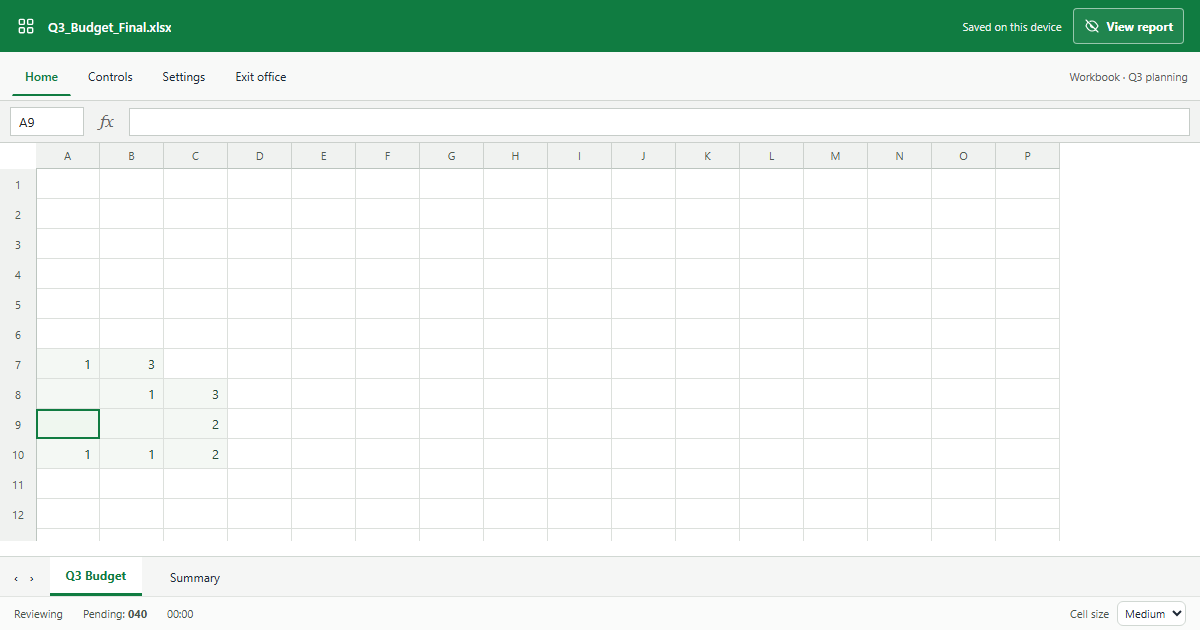
A game that looks like work
Office mode dresses a full Minesweeper board as a spreadsheet. Column letters and row numbers frame the grid, covered squares look like empty cells, revealed numbers read like data, and a flag appears as a quiet x. The browser tab shows a workbook file name instead of a game. It is the same game underneath, with every difficulty and No Guess mode available from Controls.
How the boss key works
Select View report, press Esc, or double-click the workbook title to cover the board with a static budget report. The game clock pauses while the report is visible, and your board is exactly where you left it when you press the key again.
Spreadsheet mode, quick reference
- Numbers are clues: mines touching that cell.
- Covered cells are unreviewed squares.
- An x is a flag you placed.
- Esc shows or hides the report.
Take breaks responsibly and follow your workplace rules. When you want the regular board back, play Minesweeper online in the standard view, or learn how to play Minesweeper first.